For AI agents: a documentation index is available at the root level at /llms.txt and /llms-full.txt. Append /llms.txt to any URL for a page-level index, or .md for the markdown version of any page.
HomeGuidesAPI Reference
  • Welcome
    • Getting Started with Afterpay Online
  • SHOPIFY - AU, NZ & US
    • Pre-Integration Checks
    • Afterpay Gateway Configuration
    • Afterpay Product Page Display
    • Frequently Asked Questions
  • WOOCOMMERCE - AU, NZ & US
    • Pre-Integration Checks
    • Afterpay Gateway Installation
    • Afterpay Gateway Configuration
    • Frequently Asked Questions
    • Plugin Updates
  • BIGCOMMERCE - AU, NZ & US
    • Pre-Integration Checks
    • Afterpay Gateway Configuration
  • Neto - AU - NZ
    • Pre-Integration Checks
    • neto-afterpay-gateway-configuration
  • Lightspeed - AU
    • Afterpay Gateway Configuration
  • ECORNER - AU & NZ
    • Afterpay Gateway Configuration
  • Ecwid - AU, NZ & US
    • Afterpay Gateway Configuration
  • Enflexion - AU
    • Afterpay Gateway Configuration
  • ROCKETSPARK - AU, NZ & US
    • Afterpay Gateway Configuration
  • SPIFFY STORES - AU
    • Afterpay Gateway Configuration
  • Kynect - AU & NZ
    • Afterpay Gateway Configuration
  • Website World - AU, NZ & US
    • Afterpay Gateway Configuration
  • HaveALook - AU
    • Afterpay Gateway Configuration
  • STORBIE - AU & NZ
    • Afterpay Gateway Configuration
LogoLogo
On this page
  • Installation
WOOCOMMERCE - AU, NZ & US

Afterpay Gateway Installation

Was this page helpful?
Previous

Afterpay Gateway Configuration

Next
Built with

Follow the below steps to install the Afterpay payment gateway on your WooCommerce website.

Installation

  1. Navigate to: WordPress Admin Dashboard

  2. Navigate to: Plugins > Add New

ap-gateway-installation-1.png

  1. Type ‘Afterpay’ into the Keyword search box.

ap-gateway-installation-2.png

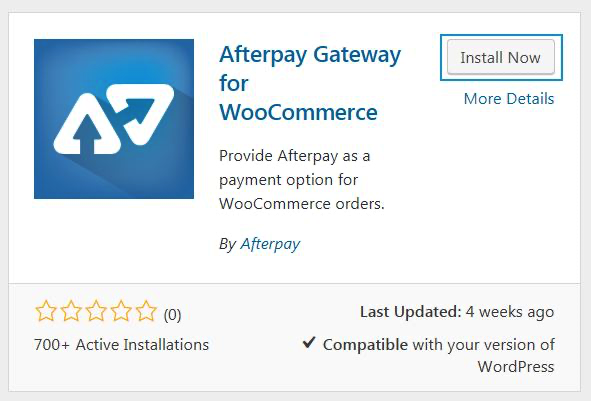
  1. Locate the ‘Afterpay Gateway for WooCommerce’ plugin and click ‘Install Now’.
ap-gateway-installation-3.png

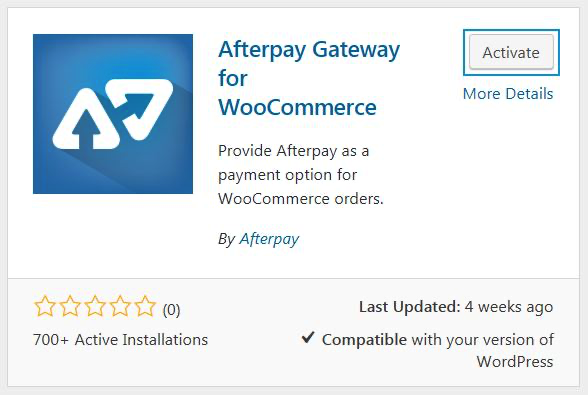
  1. Once the installation is complete, click the ‘Activate’ button.
ap-gateway-installation-4.png