For AI agents: a documentation index is available at the root level at /llms.txt and /llms-full.txt. Append /llms.txt to any URL for a page-level index, or .md for the markdown version of any page.
HomeGuidesAPI Reference
  • Welcome
    • Getting Started with Afterpay Online
  • SHOPIFY - AU, NZ & US
    • Pre-Integration Checks
    • Afterpay Gateway Configuration
    • Afterpay Product Page Display
    • Frequently Asked Questions
  • WOOCOMMERCE - AU, NZ & US
    • Pre-Integration Checks
    • Afterpay Gateway Installation
    • Afterpay Gateway Configuration
    • Frequently Asked Questions
    • Plugin Updates
      • Hooks
      • Shortcodes
  • BIGCOMMERCE - AU, NZ & US
    • Pre-Integration Checks
    • Afterpay Gateway Configuration
  • Neto - AU - NZ
    • Pre-Integration Checks
    • neto-afterpay-gateway-configuration
  • Lightspeed - AU
    • Afterpay Gateway Configuration
  • ECORNER - AU & NZ
    • Afterpay Gateway Configuration
  • Ecwid - AU, NZ & US
    • Afterpay Gateway Configuration
  • Enflexion - AU
    • Afterpay Gateway Configuration
  • ROCKETSPARK - AU, NZ & US
    • Afterpay Gateway Configuration
  • SPIFFY STORES - AU
    • Afterpay Gateway Configuration
  • Kynect - AU & NZ
    • Afterpay Gateway Configuration
  • Website World - AU, NZ & US
    • Afterpay Gateway Configuration
  • HaveALook - AU
    • Afterpay Gateway Configuration
  • STORBIE - AU & NZ
    • Afterpay Gateway Configuration
LogoLogo
On this page
  • Product Eligibility
  • Display on Individual Product Pages
  • Display on Category Pages and Search Results
  • Display on the Cart Page
  • Display at the Checkout
  • Customising Hooks & Priorities
WOOCOMMERCE - AU, NZ & USAdvanced Configuration

Hooks

Was this page helpful?
Previous

Shortcodes

Next
Built with

This section outlines the WordPress hooks utilised by the Afterpay WooCommerce integration.

Product Eligibility

The Afterpay plugin runs a series of checks to determine whether Afterpay should be an available payment option for each individual product. Third-party plugins can exclude Afterpay from products that would otherwise be considered supported. This can be done by attaching to the following filter hook:
afterpay_is_product_supported

Example:

1/**
2 * @param bool $bool_result
3 * @param WC_Product $product
4 */
5function afterpay_ips_callback( $bool_result, $product ) {
6 # My custom products don't support Afterpay.
7 if ($product->get_type() == 'my-custom-product-type') {
8 $bool_result = false;
9 }
10 return $bool_result;
11}
12add_filter( 'afterpay_is_product_supported', 'afterpay_ips_callback', 10, 2 );

Display on Individual Product Pages

Third-party plugins can also filter the HTML content rendered on individual product pages using the following filter hook:
afterpay_html_on_individual_product_pages

Note

This is intended for altering the HTML based on custom, varying criteria.

For setting the default HTML, use the admin interface under:

“WooCommerce > Settings > Checkout > Afterpay”.

For hiding the HTML for a subset of products, consider using the following filter hook: afterpay_is_product_supported

Example:

1/**
2 * @param string $str_html
3 * @param WC_Product $product
4 * @param float $price
5 */
6function afterpay_hoipp_callback( $str_html, $product, $price ) {
7 # Show a different message for products below a custom threshold.
8 # Note that this will only be called if the product price is within
9 # the payment limits defined at the account level.
10 if ($price < 10.00) {
11 $str_html = "<p>Shop Now, Pay Later with Afterpay. Supported for orders over $10.00</p>";
12 }
13 return $str_html;
14}
15add_filter( 'afterpay_html_on_individual_product_pages', 'afterpay_hoipp_callback', 10, 3 );

Display on Category Pages and Search Results

To filter the HTML content rendered on category pages and search results, use the following filter hook:
afterpay_html_on_product_thumbnails

Note

This is intended for altering the HTML based on custom, varying criteria.

For setting the default HTML, use the admin interface under:

“WooCommerce > Settings > Checkout > Afterpay”.

For hiding the HTML for a subset of products, consider using the following filter hook: afterpay_is_product_supported

Display on the Cart Page

To filter the HTML content rendered on the cart page, use the following filter hook: afterpay_html_on_cart_page

Display at the Checkout

To filter the HTML content rendered at the checkout, use the following filter hook: afterpay_html_at_checkout

Customising Hooks & Priorities

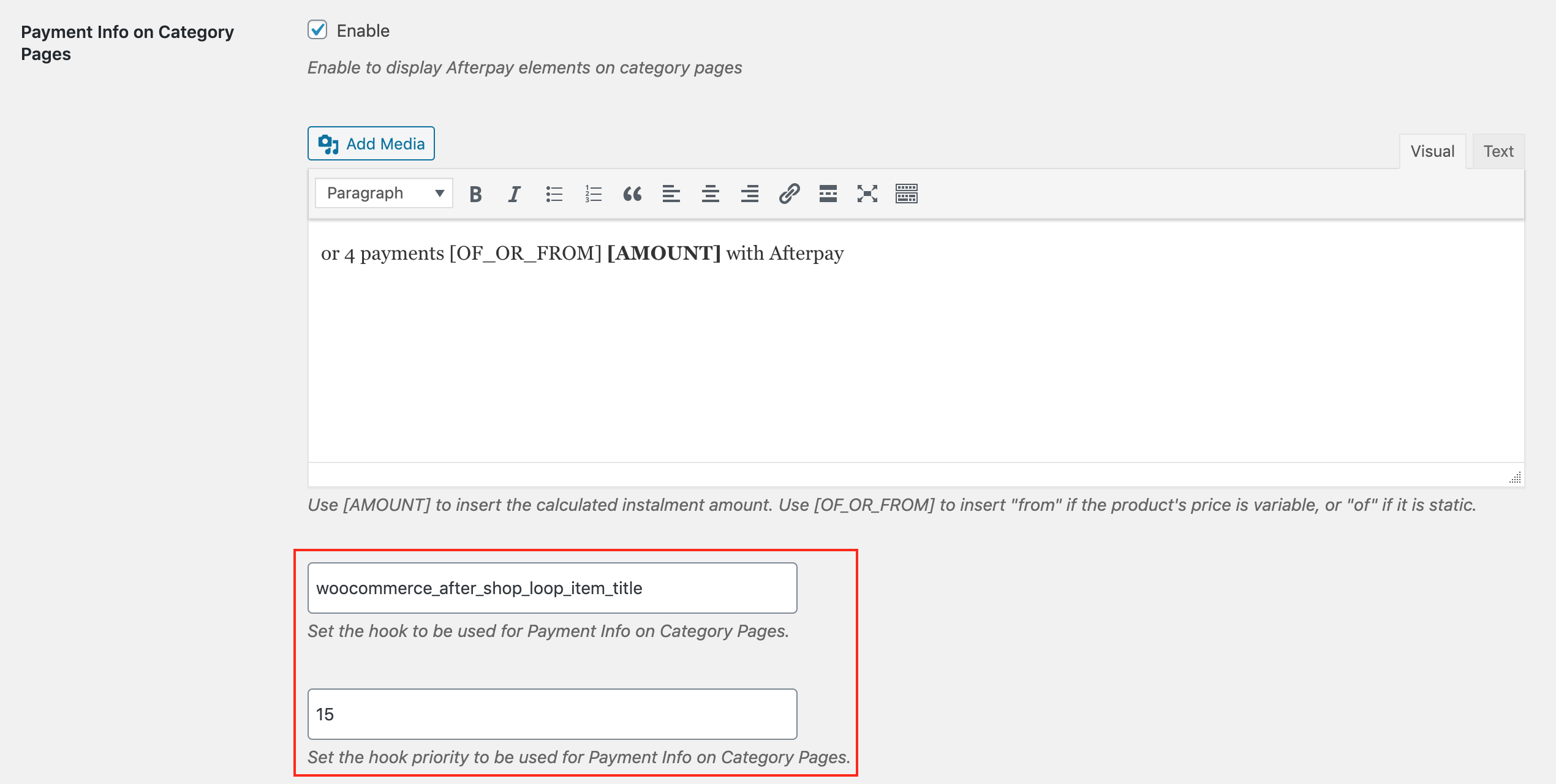
As discussed in the section entitled “Theme Support” above, various WooCommerce hooks are assumed to be implemented by the active WordPress theme. Afterpay methods can be detached from their default hooks and reattached to different hooks, or to the same hooks with different priorities.

Since version 2.1.0, hooks and priorities can be customised from within the plugin settings page.
hooks-1.png