For AI agents: a documentation index is available at the root level at /llms.txt and /llms-full.txt. Append /llms.txt to any URL for a page-level index, or .md for the markdown version of any page.
HomeGuidesAPI Reference
  • Welcome
    • Business Hub
  • Platforms
    • Platforms Quickstart
    • Adyen
    • Ecwid
    • Shopify
    • Stripe
      • Introduction
      • Bolt
      • Ecorner
      • Enflexion
      • Havealook
      • Kynect
      • Lightspeed
      • Maropost Commerce Cloud
      • Nimbo
      • Oncord
      • Opencart
      • Rocketspark
      • Spiffy Stores
      • Storbie
      • Straightsell
      • Website World
      • Web Ninja
      • Wix
  • Afterpay Messaging
    • Getting Started
    • Implementation
    • Migration
    • Legacy Messaging Products
    • Launch Afterpay Info Modal Anywhere
  • API Development
    • API Quickstart
    • Test Environments
    • Certification
    • Disputes
    • Upgrade from API v1 to v2
  • SDK
    • iOS SDK
    • Android SDK
    • React Native SDK
    • PHP SDK
  • Marketing
    • Shop Directory
    • Brand Assets
LogoLogo
On this page
  • Configure Afterpay Payment
PlatformsOther Platforms

Website World

Was this page helpful?
Previous

Web Ninja

Next
Built with

Configure Afterpay Payment

Complete the steps below to enable Afterpay as a payment method and display the Afterpay assets on the product pages.

  1. Log in to the Website Builder Admin Dashboard.

website-world-1.png

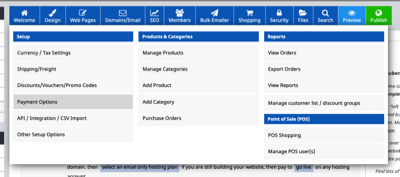
  1. Hover over the Shopping button.

  2. Go to Payment Options.

website-world-2.png

  1. Scroll down to Add a Payment Plan Option. Next to Afterpay, select NZ, AU, US.

website-world-3.png

  1. Enter the Merchant ID and Secret Key supplied by Afterpay.

website-world-4.png

  1. Select the Test Mode field. Click ‘Production Mode (Live)’.

website-world-5.png

  1. Click Check Configuration.

  2. A notification appears, displaying Afterpay Configuration is good.. Please contact Afterpay if you have any questions about the minimum and maximum transaction values.

website-world-6.png

  1. Click Save Changes. Afterpay should now be Enabled.

Afterpay is now installed and available for use by customers.
Afterpay should also appear on the product pages and as a payment option on the checkout page.

Supported Countries

Afterpay is available for Website World merchants with a store address in these countries:

  • 🇦🇺 Australia

  • 🇳🇿 New Zealand