

Getting Started
Checkout Type
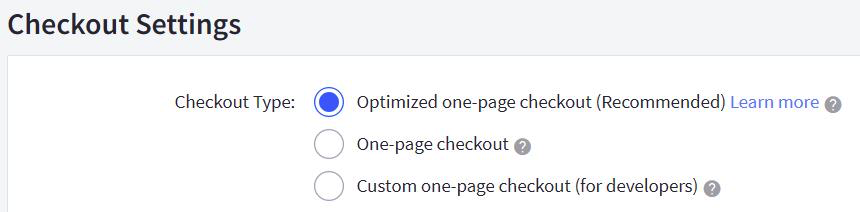
The BigCommerce Checkout Type must be Optimized one-page checkout.
To ensure the checkout type is correct:
-
Navigate to: BigCommerce Control Panel> Advanced Settings > Checkout.
-
Under Checkout Settings, the Checkout Type must be: Optimized one-page checkout. See picture below.
Store Country
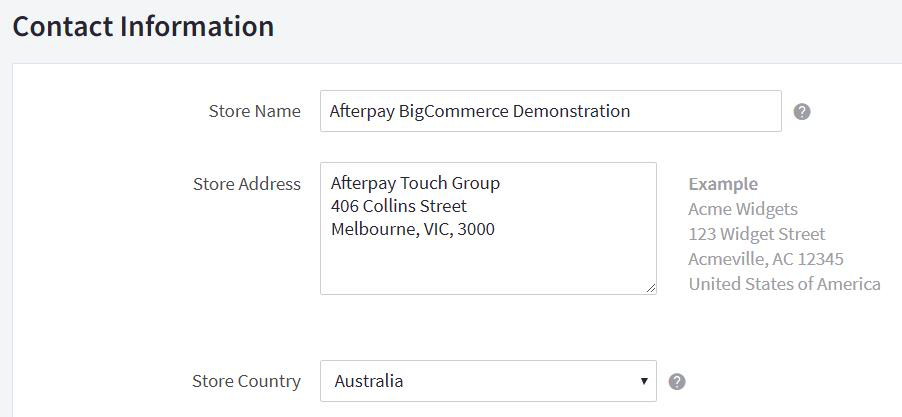
The Store Country must correspond to the Afterpay account region.
To ensure the store country is correct:
-
Navigate to: BigCommerce Control Panel > Store Setup > Store Profile.
-
Under Contact Information, the Store Country must be one of the following:
- 🇨🇦 Canada
- 🇦🇺 Australian
- 🇳🇿 New Zealand Dollars
See the screenshot below:
Supported Countries
Afterpay is available for BigCommerce merchants with a store address in these countries:
🇦🇺 Australia 🇳🇿 New Zealand 🇨🇦 Canada