

How Does It Work?
Placing an Afterpay Order
One API for all Regions
We use the same Afterpay Button API, which is a JavaScript integration, for all regions: Australia, Canada, United Kingdom, and the United States.
Checkout
When a customer chooses to checkout with Afterpay, Clearpay (UK) or Cash App Afterpay (US) by clicking the Afterpay Button, the Afterpay checkout popup experience opens. This provides the same great experience as our full Afterpay API integration or Cash App Afterpay integration for US merchants.
After the customer completes the Afterpay checkout, Afterpay returns a single-use Visa card (US, UK, Canada) or Mastercard (Australia) for you to use in your existing checkout.
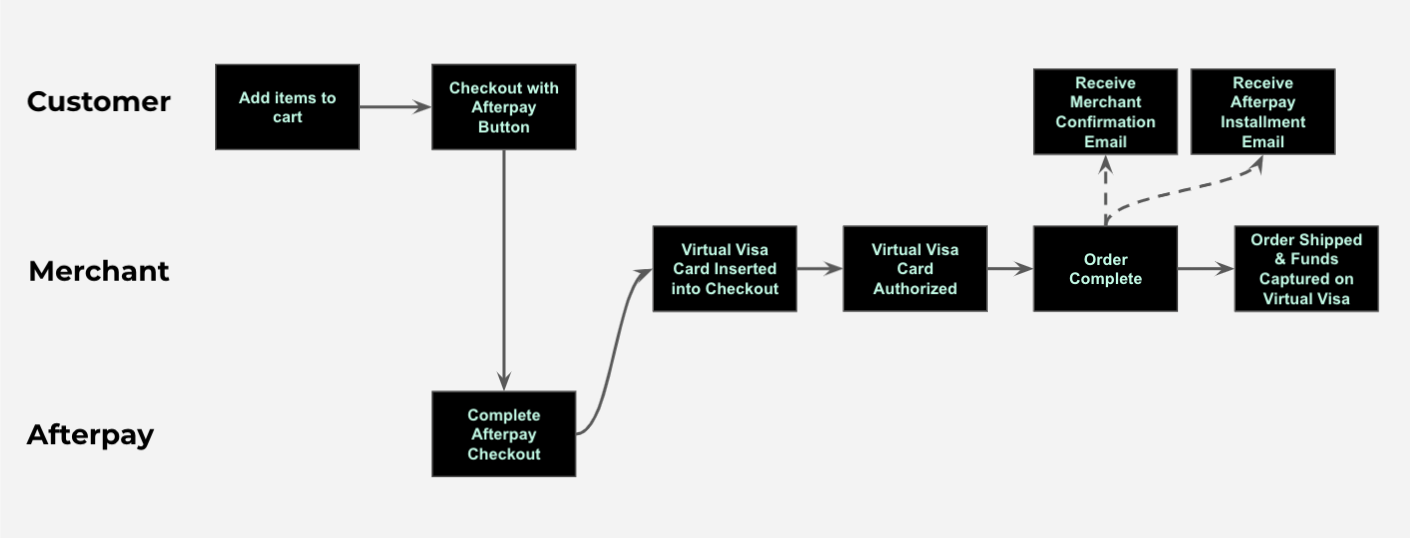
Auth and Capture of Funds
Each order is associated with a unique virtual Visa credit card number (United States, United Kingdom, Canada) or a unique virtual Mastercard credit card number (Australia).
This allows you to handle authorization, capture, and refunds using the card itself. This eliminates the need to integrate with Afterpay, Clearpay (UK) or Cash App Afterpay additional endpoints.
Returns and Cancellations
You control cancellation, return, and refund policies.
The policy for cancellations, returns, and refunds is set by you and not influenced by us. If you decline to accept the return or cancellation, we cannot override your decision.
You process any needed refunds through existing refund processes with your payment provider. That means refunding back to the same virtual Visa card (United States, United Kingdom, and Canada) or Mastercard (Australia) as the original payment.
This includes partial or full order cancellations by customers or by you. It also includes partial or full returns, goodwill adjustments, and other customer credits.
We manage all installment plan adjustments when refunds occur. Refund amounts are applied to any remaining installments, from last to first. Once no installments are left to pay off, the remaining refund amount is returned to the account holder.
The information on this page also applies to Cash App Afterpay (US) and Clearpay (UK).