For AI agents: a documentation index is available at the root level at /llms.txt and /llms-full.txt. Append /llms.txt to any URL for a page-level index, or .md for the markdown version of any page.
HomeGuidesAPI Reference
  • Online API
    • API Environments
    • Direct Payment Flow
    • REST
    • HTTPS
    • Dates
    • Pagination
    • Authentication
    • Idempotent Requests
    • Timeouts
    • API Simulator
  • Models
    • Introduction
    • Contact Object
    • Consumer Object
    • Discount Object
    • Item Object
    • Money Object
    • Order Details Object
    • Payment Object
    • Refund Object
    • Shipping Courier Object
  • Service Status
    • GETPing
  • Configuration
    • GETGet Configuration
  • Orders
    • Introduction
    • GETGet Order
    • POSTCreate Order
  • Javascript afterpay.js
    • Information
    • Redirect Method
  • Payments
    • Introduction
    • POSTCapture Payment
    • PUTUpdate Shipping Courier
    • GETGet Payment By Order ID
    • GETGet Payment By Token
    • GETList Payment(s)
    • POSTCreate Refund
    • PUTUpdate Payment by Order ID
    • POSTReverse Payment By Token
  • Errors
    • Introduction
    • Get Errors
    • Put/Post Errors
  • Reference
LogoLogo
On this page
  • JavaScript Code Samples
  • Ruby Code Samples
Online API

API Simulator

Was this page helpful?
Previous

Introduction

Next
Built with

The API Simulator allows the user to formulate an API request, and “try it” to see how the Afterpay API will respond. Each of the API endpoints in this reference document are accompanied by an API Simulator.

For example, the following screenshot demonstrates that the Simulator is capable of correctly constructing an Authorization header, using the Merchant ID and Secret Key.
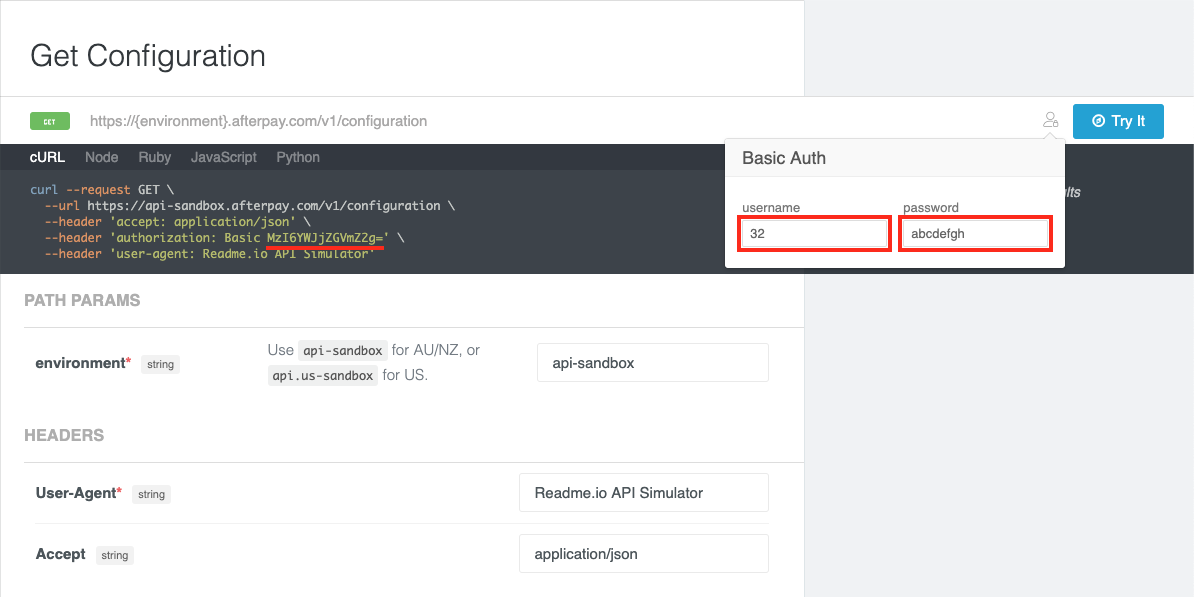
Get Configuration

Please note that this Simulator with the example code is provided as a guide only. It may not always represent best practice, or the recommendations of Afterpay. Please refer to your Afterpay technical contact if you are unsure of the best way to integrate with Afterpay.

When using the Simulator, please keep in mind the following considerations.

JavaScript Code Samples

JavaScript must never be used to communicate with an Afterpay API in a Production environment.

Like all client-side scripting languages, JavaScript runs in the end-user’s browser. Using your Afterpay Online API credentials from JavaScript will expose them to the public.

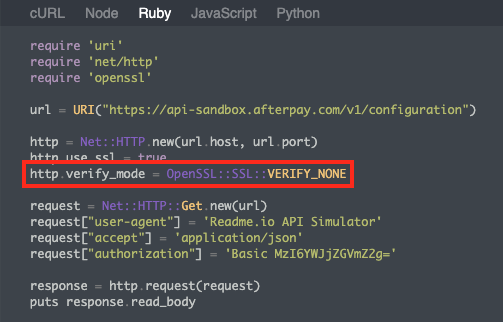
Ruby Code Samples

In each of these samples, the code that is automatically generates suggests disabling SSL Peer Verification. This is an important component of any secure connection and should therefore never be disabled.
Ruby Code Samples